How to Set Up and Run a Successful Premium.Chat Service
Setting up a Premium.Chat service is one of the lower-barrier ways to start earning online, but low barrier does not mean low ceiling. The sellers who earn consistently are the ones who set up their profiles intentionally, operate with a clear strategy, and treat their…
Setting up a Premium.Chat service is one of the lower-barrier ways to start earning online, but low barrier does not mean low ceiling. The sellers who earn consistently are the ones who set up their profiles intentionally, operate with a clear strategy, and treat their Premium.Chat business as exactly that: a business. This guide covers every step from initial setup through ongoing operations so you can build something that earns reliably.
Step 1: Define What You Are Selling
Before you write a word of your profile, be clear on what you are offering. Premium.Chat works for an enormous range of session types: expert advice, coaching, consulting, fan access, companionship, tutoring, customer support, creative collaboration, and more. The sellers who convert visitors into paying clients most effectively are the ones who know exactly who they are for and what outcome a session provides.
Ask yourself: who is the person most likely to book a session with me, and what specific problem or desire brings them to my profile? The more precisely you can answer that, the more effectively your profile will speak to exactly that person. Vague profiles attract vague interest. Specific profiles attract clients ready to buy.

Step 2: Set Up Your Profile
Your Premium.Chat profile is your storefront. Every visitor who clicks your link will read it before deciding whether to book a session. Treat it like a focused pitch, not a biography.
A strong profile includes:
- A clear headline or opening line that immediately tells visitors what you offer
- A specific description of who benefits from your sessions and what they get out of them
- Your relevant experience or credentials in enough detail to establish trust without being exhaustive
- A professional profile photo that matches the tone and niche of your service
- Session rates set for text, voice, and video that reflect your positioning and your market
Spend real time on your profile description. It is the single highest-leverage piece of writing in your entire Premium.Chat setup. A well-written description that speaks directly to the right person will outperform a generic one indefinitely.

Step 3: Set Your Rates Strategically
Your per-minute rate signals the value of your time and filters for the right clients. Too low and you attract high-volume, low-value interactions that drain your energy. Too high before you have built a reputation and you will see low conversion on your profile visits.
A practical approach: look at what active sellers in your specific niche charge on Premium.Chat. Position yourself relative to your experience level and the specificity of what you offer. A new seller in a competitive niche typically starts at the lower to mid range and increases rates as reviews build and demand grows. A highly specialized expert entering with strong credentials can price at a premium from day one.
Set different rates for text, voice, and video. Most sellers charge more for video than text, since video requires more presence. Having tiered rates lets clients choose the level of access that fits their budget while maximizing your per-minute earnings on the session types that cost you more energy.
Step 4: Use the Content Store for Passive Income
Not every person who visits your profile will be ready for a live session. The Content Store gives you a way to earn from those visitors anyway. Load it with digital products that your target client would find valuable: guides, templates, photo sets, video tutorials, recorded sessions, audio content, workbooks, or any file format you can deliver digitally.
Content Store sales happen without your live presence. A client who visits your profile at any hour can browse your content library, purchase items that interest them, and receive the files automatically. Over time, a well-stocked Content Store generates a steady passive income layer that runs alongside your session availability.

Step 5: Master Live Mode
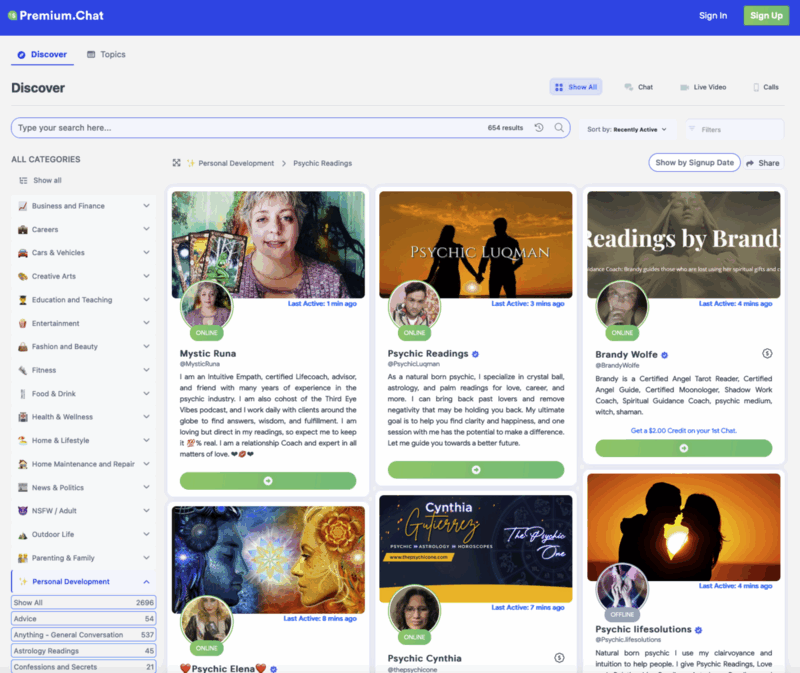
Live Mode is one of the most powerful tools in your Premium.Chat setup and one of the most underused. When you activate it, two things happen: your profile gets elevated placement in the Discover marketplace, and every visitor to your profile sees that you are available right now. Both effects drive more session starts.
Build Live Mode into a consistent schedule. Even a few predictable hours per day during which you are reliably available creates the kind of routine that repeat clients build their booking habits around. Announce your Live Mode hours on social media so your followers know when to find you. The combination of promoted availability and the Live Mode urgency signal is one of the most reliable session generators on the platform.

Step 6: Drive Traffic to Your Profile
Premium.Chat’s Discover marketplace sends organic traffic to active profiles, but the sellers who earn the most do not wait for Discover alone. They actively drive their existing audience to their profile link.
The most effective traffic sources for Premium.Chat profiles are:
- Social media bios: Add your Premium.Chat link to every platform where you have followers
- Instagram and Snapchat Stories: Use the link sticker on availability announcements
- TikTok and Reels: End videos with a call to action pointing to your bio link
- X (Twitter): Pinned posts and regular availability announcements
- YouTube: Video descriptions and verbal mentions during content
- Email lists: Direct announcements to subscribers who already trust you
Consistency is the variable that separates sellers who build real income from those who see sporadic results. Regular promotion keeps your profile visible to your audience and builds the habit of checking for your availability among your most interested followers.
Step 7: Build and Engage Your Client Base
The most valuable asset you build on Premium.Chat is a base of repeat clients. A client who books with you monthly is worth far more over time than a one-time buyer, and repeat clients require far less marketing effort to convert than cold profile visitors.
Use the My Contacts page in your Premium.Chat account to monitor who is active and reach out to past clients when you go into Live Mode or when you add new content to your store. A short, personal message to a client you have already worked with is one of the highest-conversion actions you can take on the platform. Keep it genuine and relevant, not a mass blast.
The balance to maintain: stay present in your clients’ awareness without overwhelming them. One or two touchpoints per week is enough to keep warm relationships active. The goal is to be top of mind when they have a need, not to flood their notifications.
Step 8: Add the Referral Program to Your Income Stack
Beyond sessions and content sales, Premium.Chat’s two-tier referral program adds a passive income layer to your earnings. When you refer another seller to the platform through your referral link and they start earning, you receive 2.5% of their revenue permanently. Their referrals earn you an additional 2.5% at the second tier.
If you have an audience of creators, coaches, or professionals who could benefit from Premium.Chat, the referral program turns your recommendation into ongoing passive income. Find your referral link on the Referral page of your account.
Operating Your Service Like a Business
The sellers who earn the most from Premium.Chat share one trait: they treat it like a business, not a hobby. That means consistent availability, ongoing promotion, a regularly updated Content Store, and active client relationship management. It means setting income goals and working backward to the session volume and rates required to hit them. It means treating each session as an opportunity to build a long-term client relationship, not just close a single transaction.
The infrastructure is all there. Premium.Chat handles billing, session management, content delivery, and payouts on the 10th of each month. Your job is to show up, deliver value, and keep your profile in front of the right people.
If you have not set up your profile yet, create your free Premium.Chat account here and get your service live today.
Frequently Asked Questions
Can I run a Premium.Chat service part-time around other work?
Yes. Premium.Chat is fully flexible around your schedule. You control when you are available by activating and deactivating your profile. Many successful sellers operate part-time during evenings or weekends and build their client base gradually before expanding their availability.
How do I attract my first clients on Premium.Chat?
The fastest path to first sessions is sharing your Premium.Chat profile link with your existing audience on social media. Making a specific announcement post explaining what you offer and who should book converts well. Premium.Chat's Discover marketplace also sends organic traffic to active profiles, so keeping your profile live helps from day one.
How do I build a base of repeat clients on Premium.Chat?
Deliver genuine value in every session. Follow up with clients through the Premium.Chat contacts system when you have relevant updates or new availability. Use the My Contacts page to monitor who is active and reach out to past clients with a short message. Clients who feel seen and valued come back regularly.
How do I handle difficult or problematic sessions on Premium.Chat?
You are always in control of your sessions on Premium.Chat. You can end any session at any time. If a client is behaving inappropriately, end the session immediately. You are under no obligation to continue a conversation that makes you uncomfortable. Premium.Chat's support team is available if you need to report a problematic client.
How do I set the right rate for my Premium.Chat sessions?
Research what active sellers in your niche charge on Premium.Chat and consider your experience level and the tangible value of your advice per minute. Starting at a moderate rate and adjusting upward as your profile builds reviews and repeat clients is a practical approach. It is easier to raise prices than to lower them.
How do I set up a Premium.Chat service from scratch?
Create a free Premium.Chat account, write a profile description explaining what you offer and who it is for, set your rates for text, voice, and video sessions, add a profile photo, and copy your profile link. Adding that link to your social media bios is the final step before you are live and accepting sessions.
How does Premium.Chat pay out earnings?
All earnings, including session revenue, content sales, and referral income, are paid out on the 10th of each month after the platform fee is deducted. Payouts go to the payment method you have set up in your account settings.
How does the Premium.Chat Content Store work?
The Content Store lets you sell digital files at flat prices directly from your Premium.Chat profile. Photos, videos, guides, templates, and audio recordings are all supported. Content Store sales happen automatically without requiring your live presence, creating a passive income stream alongside your session earnings.
How important is consistency for earning on Premium.Chat?
Consistency is one of the top drivers of long-term Premium.Chat income. Sellers who promote their profile regularly, use Live Mode during predictable hours, and keep their content store updated build momentum that compounds over time. Sporadic activity produces sporadic results. Treating it like a business produces business-level returns.
What is Live Mode on Premium.Chat and should I use it?
Live Mode activates your profile as available right now, improving your ranking in the Discover marketplace and signaling to visitors that sessions can start immediately. Sellers who use Live Mode during active hours consistently earn more per availability window than those who rely on passive profile visibility alone.
What should I include in my Premium.Chat profile description?
Your profile description should clearly state what you offer, who benefits from a session with you, and what a client can expect to get out of the conversation. The more specific you are about your niche and the outcomes you deliver, the higher your conversion rate will be from profile visitors to paying clients.
What types of sessions perform best on Premium.Chat?
Advice-driven sessions in specific niches perform strongest: business coaching, fitness and nutrition guidance, financial advice, career coaching, relationship consulting, and niche expertise conversations. Entertainment and fan access sessions also generate strong volume. Any session type where the client receives personal, targeted value justifies a solid per-minute rate.